
Lead Scoring and Routing
The complete guide to grading booking answers, calculating A/B/C/D lead tiers, assigning closers, and understanding availability fallback
Lead Scoring and Routing
Aura can use the answers on a booking form to estimate how closely a prospect fits your offer, place that lead in an A, B, C or D tier, and prefer the closers you assigned to that tier.
This is the complete guide. It explains the configuration screens, the score calculation, what prospects see on the calendar, and every fallback that can widen the closer pool.
What this guide covers
This guide covers Aura booking leads from form submission through score calculation, disqualification, calendar display, and closer assignment. It also covers changes to scoring configuration and historical rescoring.
Aura can only score a lead when it has graded answers or trusted lead data. A booking lead with neither remains Not scored and uses the scheduler's normal full-host routing. Aura does not assign a score merely because somebody:
- Visits a landing page or scheduler.
- Starts a form without producing a saved booking lead.
- Opens an email, clicks an ad, or returns to the site.
- Has previous calls or other multi-touch history.
- Belongs to a particular pipeline stage.
- Is manually described as high priority by a rep.
Those signals may be useful elsewhere in Aura, but they are not silently added to this lead score. The score remains explainable from the supported inputs described below.
Where each control lives
| Decision | Configuration surface | Scope |
|---|---|---|
| Which answers indicate fit | Scheduler form question editor | That scheduler |
| Which answers hard-disqualify | Scheduler qualification settings | That scheduler |
| Which closers receive each tier by default | Scheduler > Lead routing | Organization default |
| Different tier assignments for one scheduler | Scheduler Routing step | That Scheduler |
| Who can receive bookings at all | Scheduler host roster | That scheduler |
| When each host can receive bookings | Host availability and connected calendar | That host |
| Relative preference among eligible hosts | Booking-share weight | Applicable routing pool |
Scoring and routing are separate controls. Scoring decides the lead's tier. Routing decides which eligible hosts Aura prefers for that tier.
The short version
The complete path is:
Booking-form answers
        ↓
Answer grades: A / B / C / D
        ↓
Answer score from 0-100
        ↓
Final score, sometimes updated with trusted lead data
        ↓
A / B / C / D lead tier
        ↓
Preferred closers for that tier
        ↓
Fallback or Strict availability mode
        ↓
Visible calendar and final closer assignment
The two rules most likely to prevent a configuration mistake are:
- Fallback is the default. When a preferred tier has fewer than three available slots, Aura widens the calendar to every eligible host on that scheduler.
- Strict keeps an assigned grade with its selected closers, including when that leaves one, two, or zero slots.
- Neither mode automatically moves from A to B to C to D.
Step 1: Grade the answers that reveal fit
Open a scheduler, edit a qualifying question, and enable lead scoring. Grade each answer according to what it means for this specific offer.
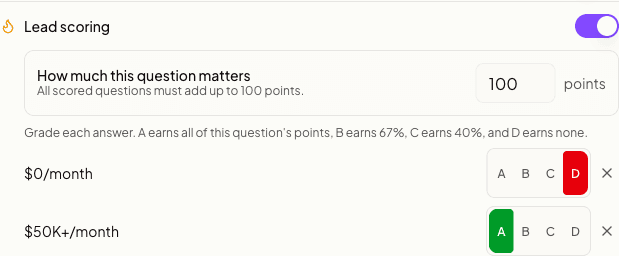
| Grade | Share of this signal | Meaning |
|---|---|---|
| A | 100% | Strongest-fit answer for this question |
| B | 67% | Good fit, with some qualification still needed |
| C | 40% | Weaker fit, but still potentially workable |
| D | 0% | Poor-fit answer that should lower the score |
| Ignore | - | Do not use this answer when calculating fit |
These grades describe the answer, not the whole lead. A lead answering one question A and another C receives a score based on both.
Set how much each question matters using Influence. Influence is relative, so the values can total any amount. A question with influence 3 counts three times as much as one with influence 1. Aura normalizes the values for you.
Which questions should be graded?
Grade questions whose answers genuinely change who should take the conversation or how urgently it should be handled:
- Budget or monthly revenue
- Purchase timeframe
- Decision-making authority
- Company size
- Location or service area
- Offer-specific eligibility
Do not grade a field merely because it is available. Name, preferred contact time, referral details, and open-ended context often help a closer prepare without indicating whether the lead is a better fit.
Supported grading behavior
- Select questions: grade each option individually.
- Checkbox questions: grade checked and unchecked separately.
- Number questions: create ordered numeric bands; the first matching band wins.
- Multi-select questions: the highest selected grade wins for that question.
- Phone and email fields: can optionally affect the score through email-type or phone-region rules.
- Ignored answers: do not count. Aura recalculates the score using the answers that remain.
Required versus optional questions
If a required scored question is unanswered or cannot be classified, it remains in the calculation at zero. An optional missing question does not count. A deliberate D answer remains in the calculation at zero; Ignore removes that answer from the calculation.
Step 2: Set how important each question is
Each scored question has an Importance number. You can choose from 1 to 10. A higher number makes that question count more. Aura works out the percentage for you. An older link may show a number above 10. It still works.
Answer score = each answer's grade x that question's importanceAn A answer earns 100 percent of its normalized share, B earns 67 percent, C earns 40 percent, and D earns 0 percent.
One-question example
Suppose a budget question has importance 1 and is the only scored question:
| Answer grade | Calculation | Answer score | Grade |
|---|---|---|---|
| A | 100% × 100% | 100 | A |
| B | 100% × 67% | 67 | B |
| C | 100% × 40% | 40 | C |
| D | 100% × 0% | 0 | D |
The visible grade and the final score band therefore stay predictable.
Multiple-question example
Imagine three questions with importance 5, 3, and 2:
| Question | Importance | Share of score | Answer grade | Points earned |
|---|---|---|---|---|
| Monthly revenue | 5 | 50% | A | 50 |
| Timeline | 3 | 30% | B | 20.1 |
| Decision maker | 2 | 20% | C | 8 |
| Total | 10 | 100% | 78.1 |
The answer score rounds to 78. Optional email and phone rules can adjust a lead's existing score by up to 10 percent. They cannot score a lead by themselves.
No scoring configuration
If no field has scoring enabled - or every configured answer is Ignore - the lead remains Not scored. Aura does not turn missing configuration into a D grade.
All-D configuration
If fields participate in scoring but every attainable answer is D, the result is a real score of 0 and tier D. That is different from an unscored lead: the configuration explicitly says every available response is poor fit.
Step 3: Test a lead before publishing
Use Test a lead in the scheduler editor to pick sample answers. The score and grade update as you pick, before any real lead fills in the form.
Questions look the way leads see them. A question with one answer shows round buttons. A question that allows several answers shows check boxes.
To clear a round button, select the X next to it. To clear a check box, select it again.
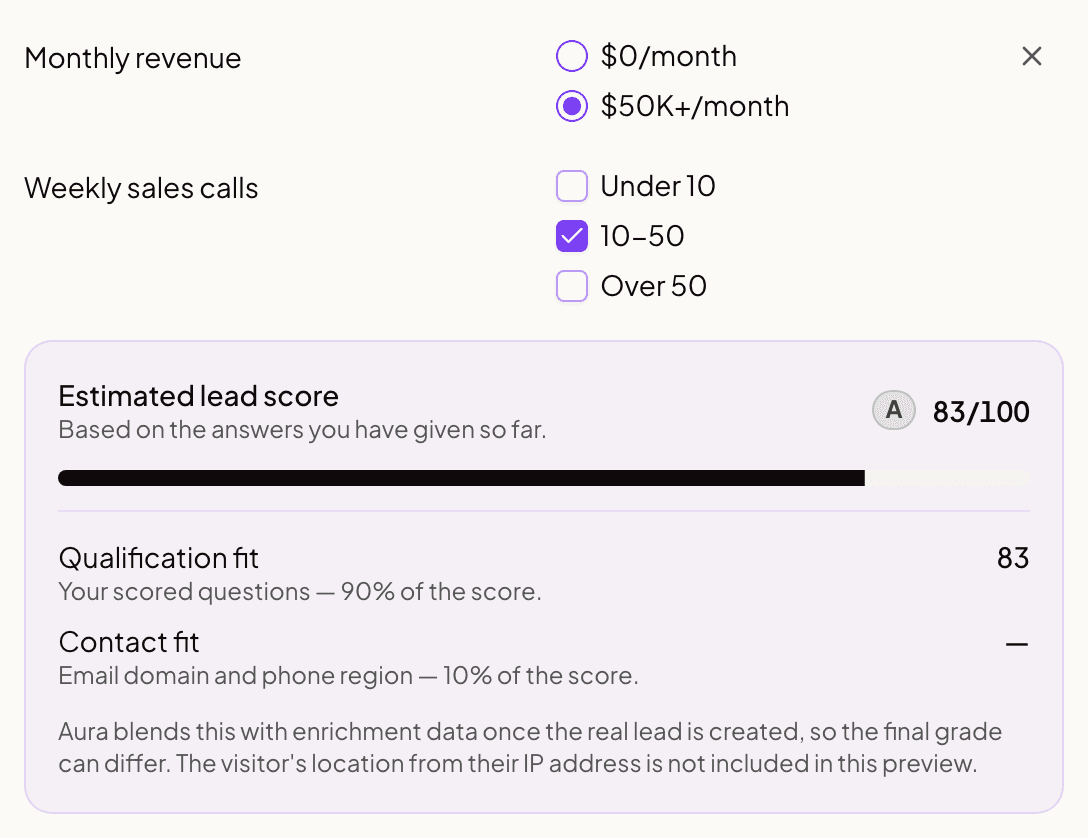
Test at least these cases:
- Your ideal customer answers every graded question.
- A realistic middle-of-the-road prospect answers the form.
- The weakest lead you still want to accept answers it.
- Optional scored questions are left blank.
- A disqualifying answer is selected.
Do not test only the perfect case. Most routing surprises come from the boundary between B and C or from an optional question that silently contributes zero.
Step 4: How Aura produces the final score
Aura starts with the prospect's answers. It may also check trusted company and contact data after the form is submitted.
| Available information | What Aura uses |
|---|---|
| Answers and extra lead data | 60% answers + 40% extra lead data |
| Answers only | Answer score unchanged |
| Extra lead data only | Extra-data score unchanged |
| Neither | Lead remains Not scored |
When email or phone rules are on, they can adjust an existing score by up to 10 percent. These rules alone leave the lead Not scored.
The score is rounded and clamped to the 0-100 range. The tier is always derived from the final score; Aura does not calculate a score and independently choose a different tier.
When each signal arrives
Aura scores the answers when the form is saved. It checks extra lead data in the background, so booking is not delayed. If that check adds useful information, Aura updates the final score. A rule that blocks booking always wins.
This means a lead may briefly show an answer-only score before Aura finishes its checks. The score details show what Aura used for the current result.
Tier thresholds
| Tier | Final score | Typical interpretation |
|---|---|---|
| A | 80-100 | Highest-fit or highest-priority leads |
| B | 60-79 | Strong leads that fit the normal sales motion |
| C | 40-59 | Lower-fit or overflow-ready leads |
| D | 0-39 | Weak-fit leads or leads overridden by disqualification |
The interpretation is yours. Aura supplies the consistent bands; your answer grading decides what reaches them.
Controlled-rollout modifiers
Some organizations may have extra location or AI-based scoring controls. These can adjust an existing score, but they cannot create one by themselves. If you do not see these controls, Aura is not using them for your scores.
Disqualification always takes priority
Lead scoring ranks fit. Disqualification answers a different, binary question: should this prospect continue through the normal booking flow at all?
When a form rule disqualifies a lead:
- The effective lead score becomes 0.
- The effective tier becomes D.
- Aura keeps the original answer and lead-data details in the score explanation.
- A later lead-data check cannot promote the lead out of the blocked state.
Use scoring for gradients such as "better" and "weaker." Use Disqualification Rules for hard boundaries such as unsupported countries, minimum legal requirements, or an offer the prospect cannot buy.
Step 5: Assign closers to each tier
Go to Scheduler, then Lead routing. Turn Lead routing on and choose which team members should be preferred for A, B, C and D leads.
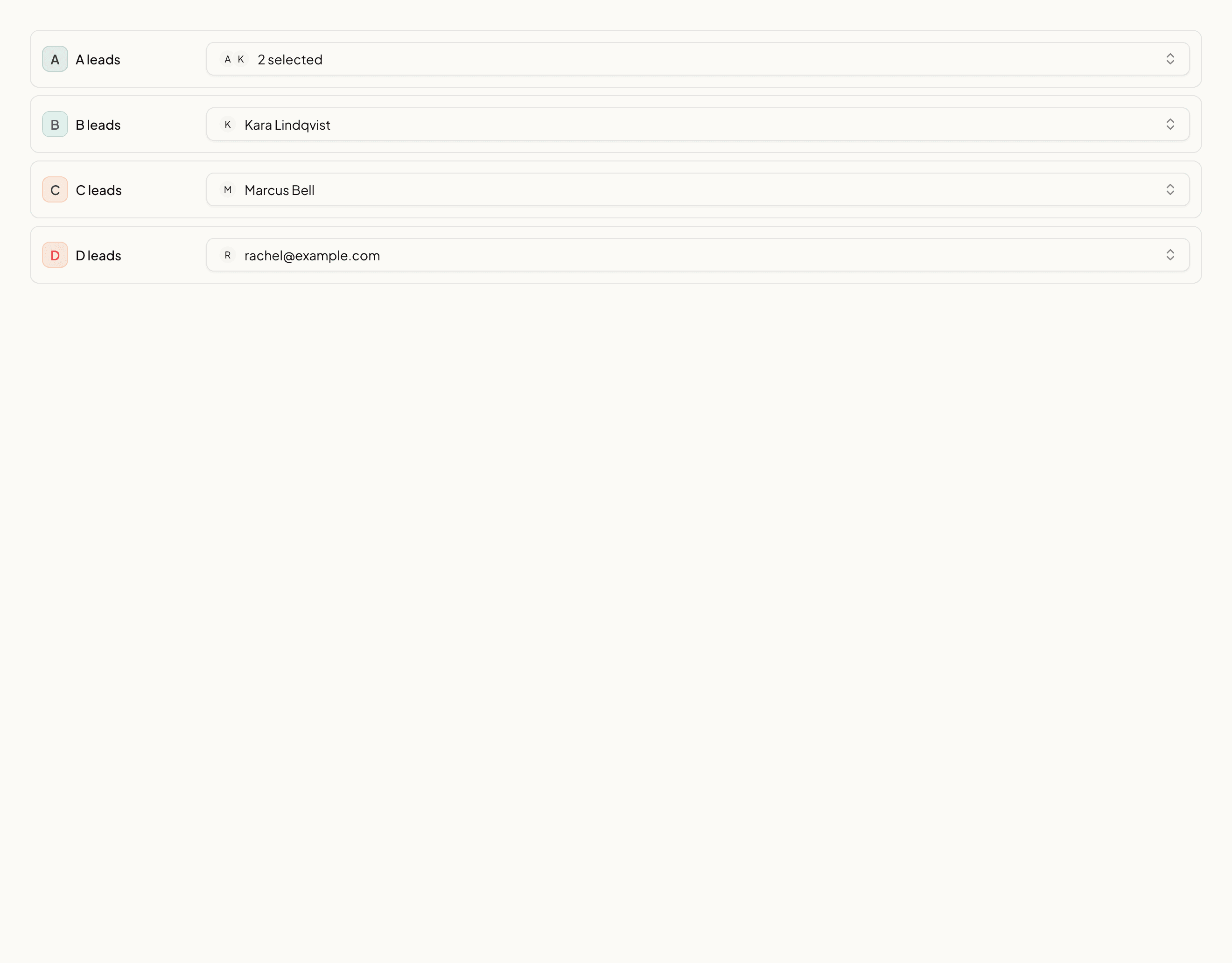
Typical setups include:
| Setup | Example |
|---|---|
| Seniority routing | Senior closers for A; developing closers for C and D |
| Product specialization | Enterprise specialists for A/B; generalists for C/D |
| Geographic coverage | Region-specific closer groups, provided the scheduler roster matches |
| Shared team | The same closers assigned to every tier |
| Overflow | Add the overflow closer to every grade they are allowed to receive |
Choose Fallback or Strict
The availability mode is one flat control in the team default and scheduler override editors.
| Mode | What the lead sees | What happens at final assignment |
|---|---|---|
| Fallback | Every open time the assigned closers have, even just one. Widens to the whole eligible team only when they have none. | If assigned closers cannot take the selected slot, Aura may assign another eligible host. |
| Strict | Only assigned-closer slots, even when one, two, or zero exist. | Aura never assigns the lead outside the configured grade pool. A stale slot asks the lead to choose another time. |
Fallback is the default for existing and new rules. Strict is an explicit isolation choice.
An unscored lead or a grade with no assigned closers uses the whole eligible team in both modes. Strict applies only after a grade has at least one configured assignment.
The editor always shows this warning: A closer assigned only to C is not overflow for A. Add them to A if they can take A leads.
Team default and scheduler override
Aura resolves routing configuration in this order:
- The scheduler's own routing override, when one exists.
- The organization's team default.
- Standard first-free behavior when neither has a valid routing configuration.
A scheduler override replaces the team default for that link. It does not merge individual tier assignments from both configurations.
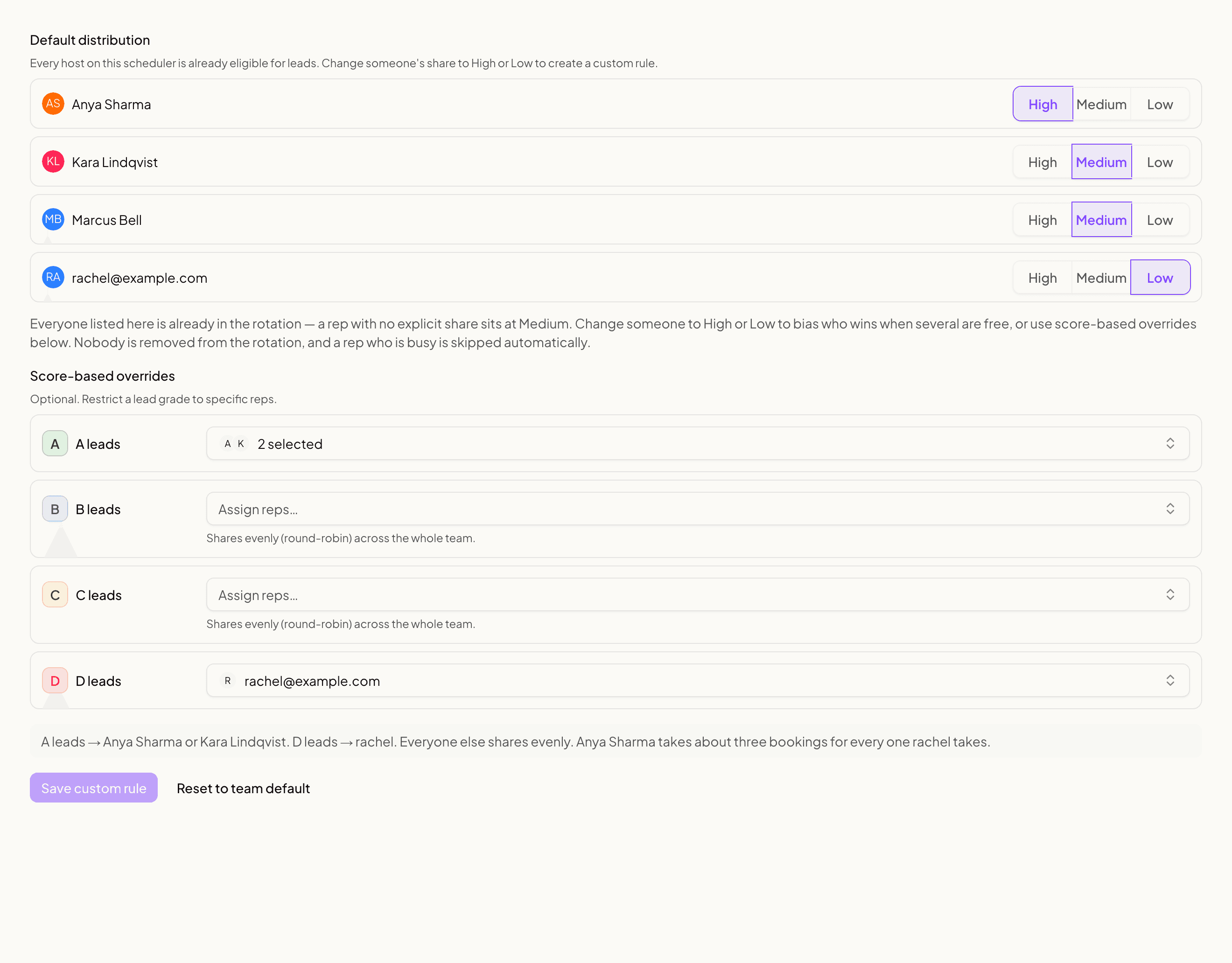
A closer must also be a host
Tier assignments cannot add somebody to a scheduler. Aura intersects the configured tier members with that link's current host roster. If a closer is assigned to tier A but is not a host on the link, Aura cannot expose or book that closer's calendar there.
This prevents a stale or foreign member ID from routing a booking outside the scheduler's approved team.
When Lead routing is off
Turning Lead routing off removes tier-based host preference. It does not disable lead scoring, delete stored scores, or remove hosts from a scheduler. The scheduler continues with its standard assignment strategy across its eligible host roster.
The Team default on Scheduler, then Lead routing applies to your whole organization.
Turning routing off for one scheduler
A single scheduler can opt out while the rest of your organization keeps routing. This is what you want for a webinar link, where filling the calendar matters more than matching a grade to a closer.
Open the scheduler from Scheduler, go to its Routing step, and choose Routing off. Any free host can then take any lead on that link, whatever the team default does.
Two things worth knowing:
- A scheduler with no custom rule follows the team default. Off is a decision you make on the scheduler, not the absence of one, so use the switch rather than clearing the custom rule.
- Assigning every closer to every grade produces the same booking behaviour, but it is not the same setting. It reads as routing being on, and a closer who joins later receives nothing until somebody adds them to all four grades. Use the switch.
Single-host schedulers
A single-host link can still calculate and display a lead score and tier. Tier routing cannot change the recipient because only one eligible host exists. Disqualification and score visibility still behave normally.
Booking share within a tier
Tier assignment decides who is eligible. Booking share decides who is preferred among those eligible.
| Share | Relative weight |
|---|---|
| High | 3 |
| Medium | 2 |
| Low | 1 |
Weights influence distribution over time; they do not guarantee an exact sequence and never make an unavailable closer eligible. A high-share closer cannot receive a time at which their calendar is busy.
If Aura falls back to the full host pool, configured weights still participate. The fallback means "share across all eligible hosts according to the configured picker," not "ignore every routing preference."
Step 6: What the prospect sees on the calendar
After the prospect submits enough information to be scored, Aura knows their tier and can compare the calendar's slots with the closers assigned to it.
Fallback mode
Aura shows every open time the tier's assigned closers have in the returned window, even if that is only one. If they have no open times, Aura widens the offer to the entire eligible host pool for that scheduler. Adding a closer to a grade never takes times away from that grade.
For example:
- Sarah is assigned to A leads.
- Sarah has five valid slots.
- Darren's test lead scores A.
- The prospect sees those five A-closer slots, not the other hosts' calendars.
Strict mode
Strict mode never widens. The lead sees only the assigned grade's closer availability. One preferred slot means one visible slot. Zero preferred slots means "No times available."
The final booking picker enforces the same pool. It does not quietly assign an A lead to a B-only or C-only closer if the selected A closer becomes unavailable between listing and confirmation.
"Who is next?"
There is no automatic ladder from A to B to C to D.
In Fallback mode, sparse A availability widens to every eligible host on the scheduler and applies the configured assignment strategy and weights among the people free for the selected time. In Strict mode, it stays with the A pool and may show no times.
If you need an overflow closer to cover A leads before everybody else, include that closer in the A assignment as well. Putting them only in C does not make them the dedicated second choice for A.
Every mode outcome, in plain English
| Situation | Fallback mode | Strict mode | |---|---| | Assigned grade has one or more preferred slots | Shows those slots and assigns within the grade pool | Shows those slots and assigns within the grade pool | | Assigned grade has zero preferred slots | Shows the full link calendar | Shows "No times available" | | Assigned closer becomes busy for the selected slot | Assigns from the full eligible pool | Rejects the stale slot and asks the lead to choose again | | Configured assignee is outside working hours or no longer a host | Uses the full eligible pool | Shows no matching slots and never assigns outside the grade pool | | Grade has no assigned closers | Shares across the full eligible pool | Shares across the full eligible pool | | Lead has no score or grade | Shares across the full eligible pool | Shares across the full eligible pool | | Stored routing configuration is invalid | Uses standard first-free behavior | Uses standard first-free behavior | | No eligible host has valid availability | Shows "No times available" | Shows "No times available" |
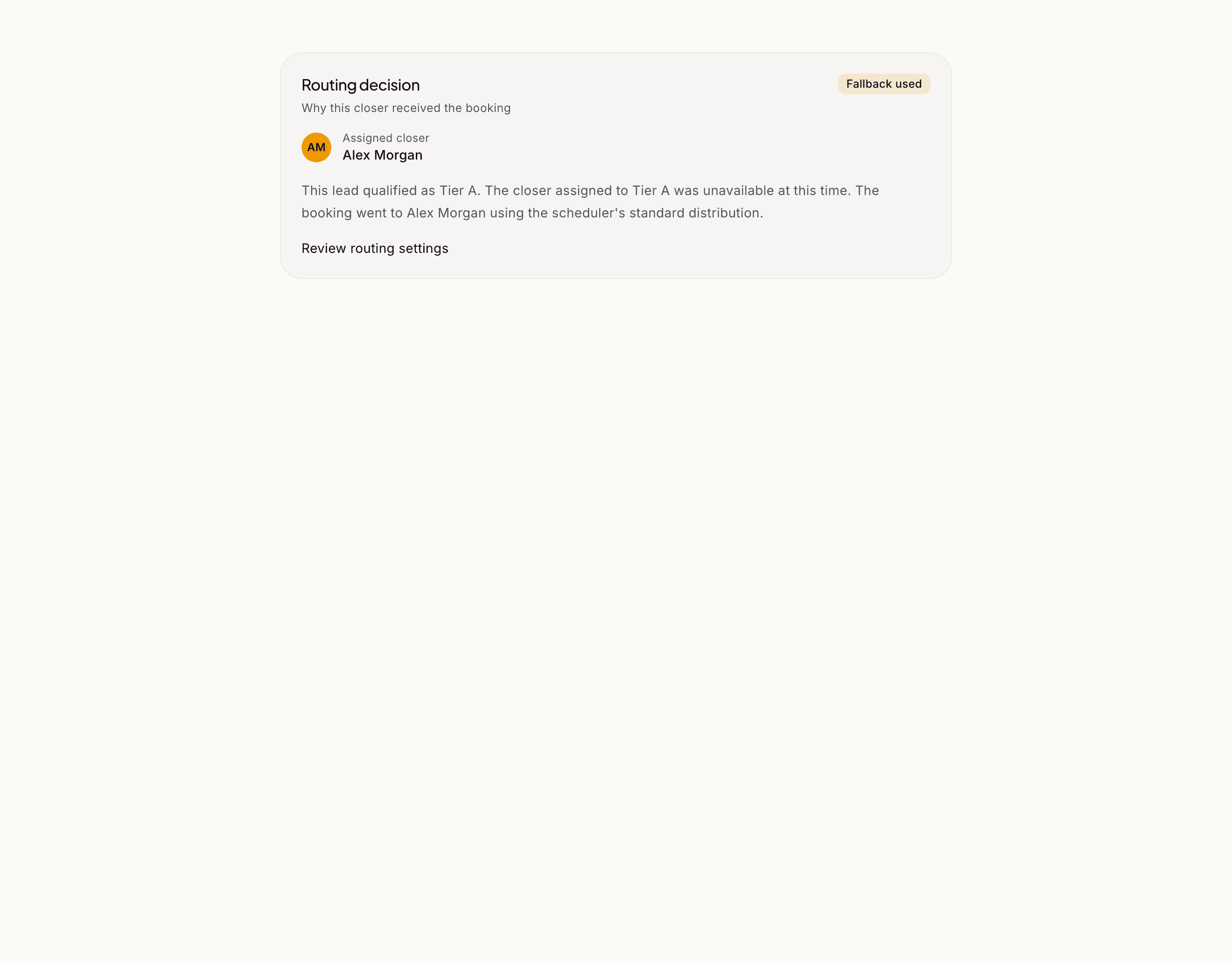
The lead's call record keeps a routing explanation describing whether the assigned pool was used and why a fallback happened.
What fallback never does
Fallback does not change the lead's score or tier. An A lead remains A even if the booking goes to somebody outside the preferred A pool. Fallback also does not add a non-host, ignore calendar conflicts, bypass working hours, or guarantee that a particular overflow closer receives the booking. Strict does not repair a missing calendar connection or create capacity. It keeps the assigned pool isolated.
Worked configuration: specialist plus US overflow
Darren has a senior closer for high-fit leads and an overflow closer who can handle any US lead.
Risky configuration
| Tier | Assigned closers |
|---|---|
| A | Darren |
| B | Darren |
| C | Overflow closer |
| D | Overflow closer |
This does not mean the overflow closer is second in line for A. If Darren has no open A slots, Aura widens to the entire booking-link roster. Any eligible, available host may receive the booking.
Safer configuration when both can handle A leads
| Tier | Assigned closers |
|---|---|
| A | Darren, Overflow closer |
| B | Darren, Overflow closer |
| C | Overflow closer |
| D | Overflow closer |
Use booking-share weights if Darren should receive a larger portion of A leads while both remain eligible. Then inspect the routing preview to confirm the effective calendar has enough coverage.
Changing scoring after leads already exist
Changing answer grades changes the meaning of future calculations. Existing leads retain their stored score until Aura scores them again or an administrator runs the controlled rescore process.
After a meaningful grading change, save the link and select Update existing lead scores. Aura then:
- Uses the latest scored booking-form submission for each lead.
- Reuses the same calculation as the live booking path.
- Preserves existing lead-data checks and block rules.
- Skips leads whose original answers or relevant scoring configuration are unavailable.
Do not manually edit lead grades. The score, grade, and explanation are designed to stay in sync.
Changes that affect only future routing
Changing tier assignments, hosts, booking-share weights, working hours, or calendar availability changes routing behavior without recalculating lead scores. Changing answer grades, numeric bands, Ignore settings, disqualification rules, or enabled score modifiers can change the meaning of a score and should trigger a review of historical rescore needs.
What a rescore cannot recover
A rescore needs both the relevant scoring configuration and the lead's stored answers. Aura skips records where it cannot reproduce the calculation safely. It does not guess missing answers, infer old configuration, or overwrite a lead with a fabricated tier.
Preview checklist before enabling routing
- Grade only questions that genuinely indicate fit.
- Test ideal, average, weak, unanswered, and disqualified examples.
- Review how many real or representative leads fall into each tier.
- Assign at least one current booking-link host to every tier you intend to isolate.
- Confirm every assigned closer has an active calendar connection and working hours.
- Choose Fallback for conversion protection or Strict for grade isolation.
- Treat a C-only overflow closer as C-only - not as the automatic fallback for A.
- Review scheduler overrides separately from the team default.
- Use booking-share weights for preference within a pool, not for eligibility.
- Recheck the preview whenever you change questions, hosts, calendars, or tier assignments.
Running a webinar or a big launch
Drop one link in a webinar chat and fifty people click it at once. This section is about that day.
The one thing to understand
Routing and capacity are two different things, and almost every worry about webinars is really about the second one.
Routing decides WHO takes a lead. Grades, assigned closers, booking share. That is everything above this section.
Capacity decides HOW MANY people can book the same time. That is simply how many of your closers are free at that moment.
Routing never changes capacity. Turning routing off does not create more seats, and turning it on does not remove any.
How many people can book the same hour
One per free closer.
Three closers, all free at 3pm, means three people can book 3pm. The fourth person sees 3pm as taken and picks another time. Two closers means two seats. One closer means one seat.
If you want more people booking each hour, add closers or open more of their hours. No routing setting will do it.
What to set up before a webinar
Use a dedicated scheduler for the webinar rather than a link that is also doing other work. Then:
- Turn routing off on that scheduler. Open it from Scheduler, go to its Routing step, and choose Routing off. Any free closer can then take any lead, so nobody is turned away because their assigned closer was busy.
- Check every closer is a host on the link. A closer who is not on the scheduler receives nothing, whatever your grades say.
- Check no two closers share a calendar. Open Scheduler, then Connections, for each closer and look at which calendar their availability reads from. If two closers point at the same calendar, one booking marks the hour busy for both, so three closers still give you one seat an hour.
- Open enough hours. Count the hours where all your closers overlap. That is your real capacity for the day.
- Book a test slot yourself, then have a colleague book the same hour. If the second booking goes through, your seats are working.
If you want routing on during a webinar
Use Fallback mode, not Strict.
In Fallback, a lead whose assigned closer is short on availability is shown the whole team instead. In Strict, that lead is shown nothing. Strict is a deliberate choice for specialist work, and a webinar is the wrong place for it.
Troubleshooting
An A lead was assigned to somebody outside the A pool
Check the routing explanation on the call. Common reasons are:
- The A pool had no open slots, so the visible calendar widened.
- The selected slot was available only to another host.
- An A closer was outside working hours.
- An assigned member was no longer a host on this scheduler.
- The scheduler override differed from the team default.
- The rule was in Fallback mode. Strict mode is required to prevent full-pool assignment.
One closer receives nearly every lead
- Check whether that closer is the only member assigned to the dominant tier.
- Inspect the tier distribution; most leads may be receiving the same grade.
- Check booking-share weights.
- Confirm other closers have connected calendars and realistic availability.
Every lead is D
- Confirm graded option text still matches the answers stored by the form.
- Check whether optional scored questions are usually unanswered.
- Look for a disqualification rule taking precedence.
- Use Test a lead and reproduce one real answer combination without entering personal data.
Leads remain Not scored
- Confirm at least one question has scoring enabled.
- Ensure at least one answer is not Ignore.
- Confirm the form was saved after grading changes.
- Check whether the organization has the scoring controls enabled.
The calendar shows the whole team despite tier assignments
- Confirm the rule says
Mode: FallbackorMode: Strict. - The preferred closers may have no open slots in the booking window.
- The tier may have no assigned member on this particular link.
- Tier-aware availability may not be enabled for the organization yet.
- The form may not have produced a tier before availability was shown.
"No times available" appears
In Fallback mode, check host working hours, busy calendar events, buffers, advance notice, maximum booking window, connection health, and whether at least one active host remains on the link. In Strict mode, also confirm the lead's grade has current assigned hosts with open time. See Availability.
FAQ
Scope and timing
Does Aura score every person who enters my funnel?
Aura scores supported booking leads when it has scored answers or trusted lead data. Anonymous visitors, abandoned forms without a saved lead, ad clicks, email engagement, pipeline activity, and multi-touch history do not create this score by themselves.
When is a lead scored?
Aura scores the answers when the booking form is saved. It may update the score after checking extra lead data. A rule that blocks booking always wins.
Can the score change after the prospect sees the calendar?
It can change if a later supported signal arrives, an administrator runs a controlled rescore, or the lead becomes subject to the authoritative disqualification state. The score explanation records the inputs used for the current result.
Does scoring slow down booking?
Answer scoring runs when the form is saved. Aura checks extra lead data in the background and does not delay booking.
What happens if scoring fails?
Aura preserves the booking flow where it is safe to do so. A lead without a valid score uses standard full-pool routing rather than being routed to nobody.
Configuration and calculations
Can I change the A, B, C and D thresholds?
No. The current thresholds are fixed at A 80-100, B 60-79, C 40-59 and D 0-39. Administrators control what reaches those bands by grading the answers that matter for their offer.
Can two schedulers grade the same answer differently?
Yes. Answer grading belongs to the scheduler's form configuration, so the same response can have a different meaning for a different offer or scheduler.
Can I use negative importance?
No. Importance is a whole number, and you can choose from 1 to 10. Give an answer a D when it should add nothing to the score. Add a block rule when that answer must prevent booking.
Can one question be worth more than another?
Yes. Give the question a larger Importance number.
Are all questions weighted equally?
No. Each scored question has an Importance number. Higher numbers count more. To prevent booking for a specific answer, add a block rule.
What happens when an optional scored question is blank?
It does not count. A missing required question remains in the score at zero.
What happens when every answer is Ignore?
The lead remains Not scored because no answer participates in the calculation.
What happens when every available answer is D?
The result is a real score of 0 and tier D. This differs from Not scored because the configuration explicitly classifies the responses as poor fit.
How are multi-select answers scored?
The highest selected grade wins for that question. Aura does not add every selected option together.
How are number ranges evaluated?
The first matching configured band wins. Keep bands ordered, complete, and non-overlapping so the result is predictable.
Does a consumer email prevent scoring?
No. The prospect's answers can still produce a score by themselves.
Can Aura's lead data check replace the answer score?
No. When answers and extra lead data both have scores, Aura uses 60 percent from the answers and 40 percent from the extra data. Email and phone rules can then adjust that result by up to 10 percent. When only one score exists, Aura uses it.
Can geographic or AI modifiers score a lead by themselves?
No. These controls can adjust an existing score, but they cannot create one when Aura has no scored answers or trusted lead data.
Disqualification
Is a D lead automatically disqualified?
No. D is a score tier. Disqualification is a separate hard rule. A D lead can continue when no disqualification rule blocks the flow.
Can a blocked lead be promoted by a later data check?
No. A block rule forces the score to 0 and grade D. Later data cannot promote the lead out of that state.
Is the original evidence lost after disqualification?
No. Aura keeps the original answers and lead-data details in the score explanation while applying the D result.
Can I use scoring instead of disqualification?
Use scoring for gradients and prioritization. Use disqualification for a rule that must prevent the normal booking path.
Routing and host eligibility
Does an A lead always book with an A closer?
Only in Strict mode, when A has configured closers. Fallback mode can widen to the full eligible host pool when preferred availability is too sparse or cannot serve the selected slot.
If the A closer is unavailable, does Aura use the B closer next?
Not specifically. Aura uses the full eligible booking-link host pool. Add a desired overflow closer to A as well if they should be eligible for A leads.
Can the same closer belong to several tiers?
Yes. This is often the clearest way to configure an experienced closer who can handle both high-priority and overflow work.
Can a tier assignment add a closer to a scheduler?
No. The closer must already be an active host on that scheduler with a usable calendar connection.
What happens when Lead routing is off?
Aura keeps calculating scores, but the scheduler uses its normal full-host assignment strategy. Turning routing off does not delete scores or tier configuration.
Does a booking-link override merge with the team default?
No. A valid booking-link override replaces the organization default for that scheduler.
What happens if a tier has no assigned closer?
Aura uses the full eligible host pool. The booking is not blocked merely because the tier assignment is empty.
What happens if an assigned closer leaves the organization?
They are no longer an eligible host. Fallback mode can use the full eligible roster. Strict mode keeps the grade isolated, so the lead may see no times until the assignment is repaired.
Can a closer receive multiple tiers?
Yes. Add the closer to every tier they are allowed to handle.
Can routing send a lead to somebody who is not a host?
No. Tier assignments are intersected with the scheduler's active host roster.
Do booking-share weights change eligibility?
No. Weights influence selection only among hosts who are already eligible and available.
Do weights guarantee an exact percentage of bookings?
No. They are relative preferences over time. Availability, selected slot, pool membership, and fallback can change the observed distribution.
Does the highest-weight closer always win?
No. The closer must be eligible and free for the selected time. Weight cannot override a busy calendar or invalid host.
Availability and fallback
Is a D answer the same as disqualification?
No. D uses a zero multiplier but still participates in the normal score. Disqualification is an explicit override that forces score 0 and tier D and may prevent the prospect from seeing availability at all.
When does Fallback show the whole team?
Only when the grade's closers have no open times at all. If they have even one, the lead sees just their times. This way a lead always has a time to book, and adding a closer to a grade never takes times away from it.
Can I change when Fallback widens?
No. The setting you control is the mode. Fallback widens only when a grade has no open times. Strict never widens an assigned grade.
What is the difference between Fallback and Strict?
Fallback protects conversion by widening to the whole eligible team when the assigned grade has no open times. Strict protects grade isolation by showing and booking only the assigned grade pool, even when that means no times.
Is the mode configured separately for A, B, C and D?
No. It is one flat mode for the routing rule. The selected mode applies to every grade that has assigned closers.
Which mode do existing routing rules use?
Fallback. Existing rules keep their current behavior until an administrator explicitly selects Strict and saves.
Can a scheduler use a different mode from the team default?
Yes. Create a scheduler routing override and select its mode there. A saved scheduler override replaces the full team-default routing rule for that scheduler.
Does Strict automatically try B, C or D when A has no times?
No. Strict does not cascade between grades. Add a closer to A if they are allowed to take A leads.
What does Strict do when a grade has no assignments?
It uses the full eligible team. Strict isolates configured grade pools. It does not turn an empty grade row into a blocked calendar.
What if a Strict slot becomes unavailable while the lead is booking?
Aura does not assign the lead outside the grade pool. The confirmation attempt is rejected and the lead is asked to choose another available time.
Does Strict bypass working hours or calendar conflicts?
No. Strict narrows eligibility. It never creates availability, ignores a busy calendar, or overrides working hours.
Which date range counts toward the three slots?
Aura evaluates the valid slots returned for the active availability request after working hours, calendar conflicts, buffers, notice, and other scheduler constraints are applied.
Can fallback show a time that the preferred closer cannot attend?
Yes. That is the purpose of full-pool fallback. The selected time must still be valid for the host who receives it.
Can fallback double-book somebody?
No. A host must be available for the selected slot. Fallback widens eligibility; it does not bypass calendar checks.
What if every host is unavailable?
The prospect sees "No times available." Fallback cannot create capacity.
Does fallback change an A lead to B, C or D?
No. The lead keeps its score and tier. Only the eligible routing pool changes.
Does Aura try the next tier before the whole team?
No. It widens directly to the full eligible host pool. Add a desired overflow closer to the original tier if they should be preferred there.
Webinars and busy days
Fifty people are about to hit one link. What breaks?
Nothing, if your seats add up. Count the closers who are free in the hours you are promoting. That is how many bookings each of those hours can take. If fifty people want the same 3pm and you have three closers, three of them get 3pm and the rest pick other times.
Only one person could book each hour. Why?
Almost always one of three things.
Only one closer is actually free in those hours. Check working hours, not just who is on the link.
Two closers share the same availability calendar, so one booking marks both busy. Check Scheduler, then Connections.
Only one closer is a host on that scheduler. Check the scheduler's own host list.
Does turning routing off give me more seats?
No. Routing decides who takes a lead. Seats are how many closers are free. Turning routing off means nobody is turned away because their assigned closer was busy, which is worth doing for a webinar, but the seat count does not change.
Should I turn routing off for my webinar?
For most webinars, yes, on that scheduler only. You want the calendar filled. Leave it on if the webinar audience genuinely needs different closers for different answers, and use Fallback mode if you do.
Can I turn routing off for one scheduler and keep it everywhere else?
Yes. Open that scheduler from Scheduler, go to its Routing step, and choose Routing off. Your other schedulers are untouched.
I assigned every closer to every grade. Is that the same as off?
It books the same way today, but it is not the same setting. It reads as routing being on, so nobody looking at your setup can tell what you meant. It also breaks quietly: a closer who joins later gets nothing until somebody adds them to all four grades. Use the switch.
A prospect booked four times in one day. Can I stop that?
Not from routing. Routing decides who takes each booking, not how many a person may hold. Each submission is treated as a new booking.
Our closer links skip routing entirely. Is that expected?
Yes. A link with one host has one possible recipient, so grades cannot change anything. Those links are useful precisely because they are predictable.
A closer is on the team but got no bookings. Where do I look?
In order: are they a host on that specific scheduler, do their working hours cover the times being booked, is their calendar connected, and are they assigned to the grades those leads received. The first of those is the usual answer.
Why did a lead go to the soonest available closer instead of my preferred one?
Either the preferred closers had no open times, so Fallback showed the whole team instead of an empty calendar, or someone else booked the preferred closer's time first. That is Fallback working as designed. Strict mode keeps the grade isolated and will show no times instead.
We have six schedulers. Is that a problem?
No. Each one carries its own hosts and its own routing. Having several is normal when they do different jobs.
Operations, reporting, and changes
Where can I see why a lead was routed to a closer?
The call record keeps a routing explanation that identifies the resolved tier pool and any fallback reason.
Why does one closer receive most bookings?
Check the lead-tier distribution, tier membership, booking-share weights, connected calendars, working hours, and which hosts are actually free for the selected times.
Do scoring changes update old leads automatically?
No. Existing leads are marked stale when their saved recipe fingerprint differs. An administrator starts recalculation after reviewing and saving the new recipe. Aura processes those leads in the background and newer live submissions always win over historical updates.
Do routing changes require a rescore?
No. Changing tier assignments, hosts, weights, or availability changes future routing without changing lead scores.
Can I edit a lead's tier manually?
Do not use manual edits as a scoring workflow. The score, tier, breakdown, and disqualification evidence are designed to remain synchronized through the canonical calculation.
What happens when historical answers are missing?
The controlled rescore skips records it cannot reproduce safely. It does not invent missing answers.
Can I test configuration without a real prospect?
Yes. Use Test a lead and cover ideal, average, weak, blank optional, boundary, and disqualified cases before publishing.
Does changing a question's wording affect historical matching?
It can. After changing options or scoring configuration, test representative stored answers and use the dry-run rescore to identify unmatched evidence before applying historical changes.
Product boundaries
Does Aura score anonymous visitors or abandoned form starts?
No. A saved booking lead needs scored answers or trusted lead data.
Does Aura use ad clicks, email opens, call outcomes, or pipeline activity in this score?
No. Those signals may power other Aura features, but they are not silently included in the lead score documented here.
Does Aura use previous calls or multi-touch history in this score?
No. Behavioral and multi-touch scoring are not part of the current booking lead score.
Is High Sale credit data part of this score?
Not unless the integration and its scoring contribution are explicitly available and documented for your organization. Do not describe future credit, debt-to-income, or financial-readiness signals as current default behavior.
Is Lead routing an AI model choosing the best rep?
The shipped tier-routing behavior is explicit configuration: score to tier, tier to preferred closer pool, then availability and assignment rules. Controlled or future recommendation systems must not be described as the default routing contract.
Do booking-share weights hide anyone's slots?
No. Weights influence who wins among eligible available closers. Tier-aware availability determines which slots are shown.
Are geo and AI signals always part of the score?
No. They are separate controls. When they are off, Aura uses the normal answer score and trusted lead data described above.
Related guides
- Custom Questions - collect and grade qualification answers
- Disqualification Rules - create hard qualification boundaries
- Round Robin - understand team availability and assignment strategies
- Availability - configure hours, buffers, calendars, and booking windows
- Creating Links - build the complete scheduler